

TL;DR
PagerDuty is a cloud-based incident management platform used by SREs, DevOps, and IT operations teams. It handles on-call scheduling, alert routing, escalation, and incident response across 750+ integrations. The base plan starts at $25/user/month, but add-ons like status pages and AIOps push the real cost significantly higher. For teams where that pricing doesn’t work, Spike covers the same workflow at $7/user/month with status pages included.
What is PagerDuty?
PagerDuty is a cloud-based incident management platform founded in 2009. It was built to solve a specific problem: when something breaks at 2 AM, who gets called, through which channel, and in what order? It answers that question through on-call schedules, escalation policies, and multi-channel alerting. When an incident is resolved, it captures the full timeline for post-incident review.
SRE, DevOps, and IT operations teams use PagerDuty to connect their monitoring stack to their response workflow. It integrates with 750+ tools including Datadog, AWS CloudWatch, Prometheus, ServiceNow, and Slack. The platform targets large engineering organizations running complex, high-volume operations.
Key point: PagerDuty is an enterprise-grade incident management platform. It is not a monitoring tool. It receives alerts from monitoring tools and handles everything that happens after detection.
How PagerDuty works
PagerDuty sits between your monitoring stack and your engineering team. It does not detect problems itself. It receives alerts from tools like Datadog, Prometheus, AWS CloudWatch, or Grafana, then routes them to the right person.
Here is how a typical alert flows through PagerDuty:
- A monitoring tool detects an anomaly and fires an alert to PagerDuty via webhook or integration
- PagerDuty matches the alert to a service and applies the associated escalation policy
- The on-call engineer gets notified via phone, SMS, email, or push notification
- If there is no acknowledgment within the configured timeout, PagerDuty escalates to the next responder
- The engineer acknowledges the alert, works on the incident, and resolves it
- PagerDuty logs the full timeline for post-incident review
On-call schedules and escalation policies work together. The schedule tells PagerDuty who is on call. The escalation policy tells it what to do if that person does not respond.
Key point: PagerDuty works by receiving alerts from monitoring tools, matching them to a service, and notifying the on-call engineer through a configured escalation policy. The process is fully automated once the schedules and policies are in place.
PagerDuty key features
Incident response
When an alert fires, PagerDuty creates an incident record automatically. It captures the start time, the affected service, the triggering alerts, and the assigned responder. Teams can update the incident status, add notes, and track resolution progress in a central place. For teams using Jira or ServiceNow, PagerDuty can create and sync tickets automatically as part of the response workflow.
On-call scheduling
PagerDuty’s on-call scheduling handles rotations, overrides, and shift handoffs. You can build weekly rotations, follow-the-sun schedules, and custom coverage for different teams. When an engineer swaps a shift, overrides route alerts to the covering person automatically for that window.
The scheduling interface covers everything most teams need. That said, setting up complex schedules across multiple teams for the first time does take some configuration work to get right.

Escalation policies
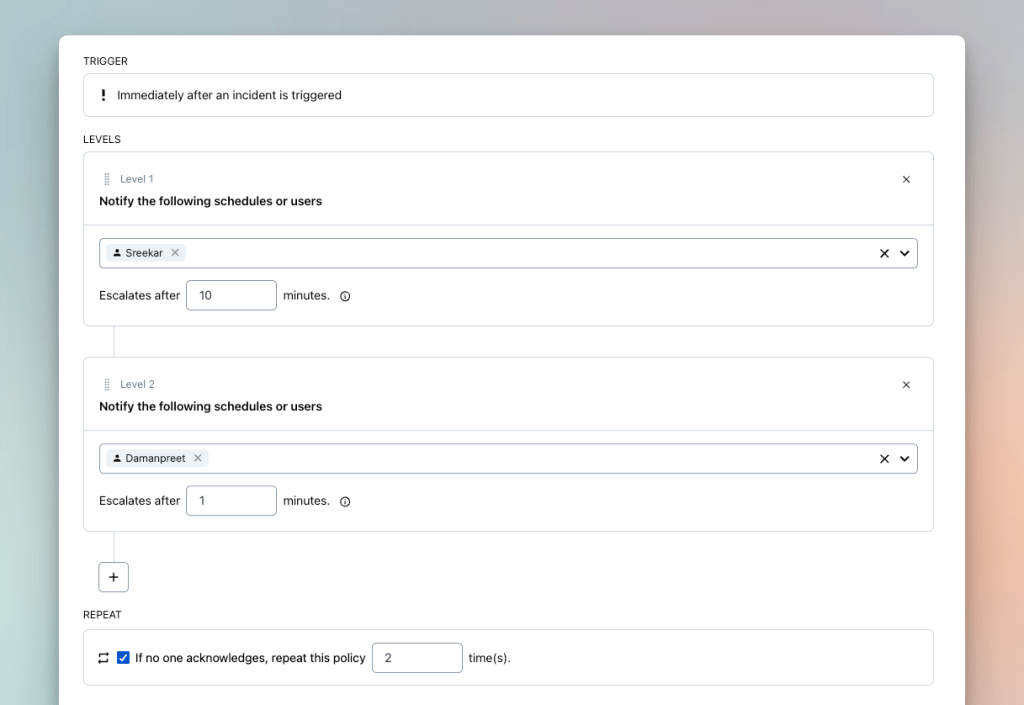
Escalation policies define what happens when an alert is not acknowledged. You set the order of responders and the timeout between steps. If step one goes unanswered, PagerDuty moves to step two automatically.
Each engineer sets their own notification preferences at the account level: phone, SMS, email, push, or Slack. PagerDuty delivers alerts across all these channels. One limitation worth noting: alert delivery is controlled entirely by the individual, not the team. When you build an escalation policy, you can specify who gets alerted at each step but not how. A manager cannot override a team member’s notification preferences for critical incidents.
Automation
PagerDuty’s automation features handle repetitive tasks automatically. When a specific alert fires, it can run scripts, restart services, or collect system information without manual intervention. This reduces the initial workload during an incident. However, runbook automation is sold as a separate add-on and is not included in any base plan.
Key point: PagerDuty’s feature set is deep, but several capabilities that sound standard are sold separately: runbook automation, status pages, and AIOps. The base plan covers alerting, on-call scheduling, and incident tracking. Everything beyond that adds to the bill.
PagerDuty Pricing
| Plan | Monthly price | Annual price | User cap | Best for |
|---|---|---|---|---|
| Free | $0 | $0 | 5 users | Evaluation only |
| Professional | $25/user/month | $21/user/month | Unlimited | Small teams |
| Business | $49/user/month | $41/user/month | Unlimited | Growing organizations |
| Enterprise | Custom | Custom | Unlimited | Large enterprises |
Free plan
The Free plan is capped at 5 users. It includes 100 international phone and SMS notifications per month, one on-call schedule, one escalation policy, and access to 750+ integrations. Phone call alerts are not available on the Free plan. For most professional teams, the 5-user cap makes this plan impractical beyond initial evaluation.
Professional ($25/user/month)
The Professional plan is where most teams start. It includes Slack and Microsoft Teams integration, SSO, post-incident reviews, and 2 predefined incident roles. You also get an external status page capped at 250 subscribers.
The limitations surface quickly. You get only 2 teams and 3 predefined incident types. Workflow automation is restricted to a single major incident workflow template with limited triggers. Most teams outgrow the Professional plan within a year.
Business ($49/user/month)
The Business plan adds custom fields, up to 3 custom incident types, and multi-year historical data access. Advanced admin features and ITSM integrations are included. The status page subscriber cap increases to 500.
AIOps, live call routing, and stakeholder licenses are not included at this tier. All three are sold separately.
Enterprise (custom pricing)
Enterprise includes advanced incident workflows with conditionals and loops. You also get 10 custom incident roles and up to 100 custom incident types. Bi-directional ServiceNow sync is included. Premium status pages, stakeholder licenses, and live call routing are bundled at this tier instead of being sold separately. AIOps is the only add-on that remains a paid extra, even on Enterprise.
PagerDuty add-on costs
| Add-on | Price | Included in |
|---|---|---|
| Status pages | $89/month per page | Enterprise only |
| AIOps | $799/month | Not included on any plan |
| PagerDuty Advance (AI) | $415/month | Credits on all paid plans |
| Live call routing | Custom pricing | Enterprise only |
| Runbook automation | $59–$125/user/month | Not included on any plan |
| Stakeholder license | Starting at $150 | Enterprise only |
What teams actually pay
The advertised price is rarely what teams end up paying.
A 10-person team on the Professional plan starts at $250/month (10 x $25). Add a status page at $89/month and the bill jumps to $339/month, or $4,068/year. That is 35% above the advertised rate, before adding anything else.
A 25-person team on the Business plan starts at $1,225/month (25 x $49). Add a status page and AIOps and the monthly total reaches $2,113, or $25,356/year. That is 72% above what the pricing page shows.
For the full breakdown, see our PagerDuty pricing guide
Where PagerDuty falls short
No team-level alert control
PagerDuty leaves alert delivery entirely to individual preferences. Each engineer sets their own notification method: phone, SMS, email, or push. There is no way for a manager or team lead to specify how alerts should be delivered to their team.
No email acknowledgment by reply
PagerDuty does not support acknowledging or resolving incidents by replying to an alert email. Engineers have to log into the platform or use the mobile app to take action.
No Slack @channel or @here mentions
PagerDuty can post alerts to Slack channels, but it does not support @channel or @here mentions. Without such mentions, alerts sometimes go unnoticed in a busy channel.
Add-ons cost extra
Several capabilities that most teams expect as standard are sold separately. Status pages cost $89/month, AIOps costs $799/month, and runbook automation starts at $59/user/month. Teams building a complete incident management stack often end up paying for multiple add-ons on top of the base subscription.
Key point: PagerDuty’s limitations are consistent across Professional and Business plans. There is no team-level control over how alerts are delivered, no email acknowledgment by reply, and no Slack broadcast mentions. Status pages and key automation features are sold separately, pushing the real cost above what the pricing page shows.
Who PagerDuty is best for
PagerDuty is a good fit if your team needs a large integration library. It connects with 750+ tools out of the box, including Datadog, AWS CloudWatch, Prometheus, and ServiceNow. If your incident workflow involves advanced runbook automation, bi-directional ServiceNow sync, or complex event orchestration, PagerDuty has the depth for it.
If that does not describe your team and you are looking for a simpler, more affordable alternative, Spike covers the core workflow at $7/user/month. More on that in the next section.
Spike: The best affordable PagerDuty alternative
Spike is an incident management and on-call platform. It covers on-call schedules, escalation policies, alert routing, status pages, and incident response in the base plan at $7/user/month. No separate add-ons. Where PagerDuty charges separately for features like status pages and automation, Spike bundles them in from the start.
Here is where Spike has a clear edge over PagerDuty:
Dual alert control
In PagerDuty, a manager can set who gets alerted in an escalation policy but not how. Spike gives control at both levels. A manager can specify that Jordan gets alerted via SMS in the escalation policy. Jordan can still override this to push notifications in his own settings.

Email acknowledgment and resolution by reply
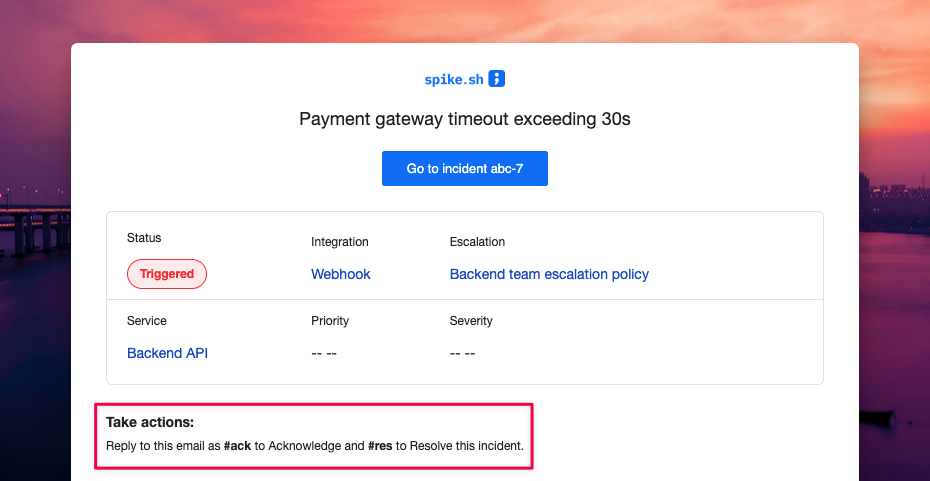
Send #ack or #res in reply to a Spike alert email and the incident updates automatically. For teams that manage part of their workflow through email, this removes a step during an active incident.
Slack @channel and @here mentions
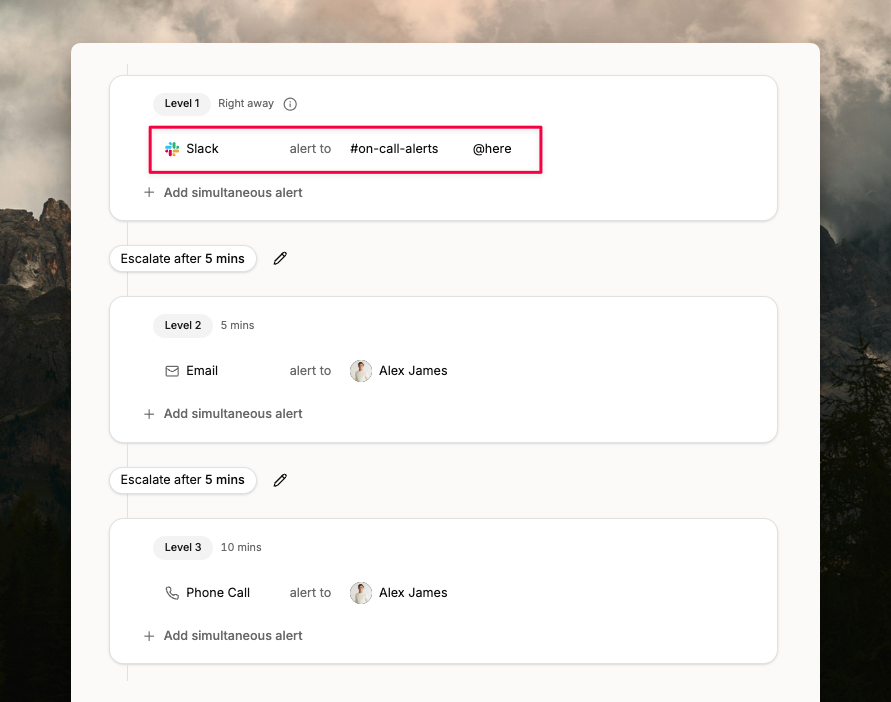
Spike supports @channel and @here mentions in Slack alerts. If an alert fires into #backend-oncall, it broadcasts to everyone in that channel. PagerDuty does not support this.
Pricing
| Plan | Monthly Price | Best For |
|---|---|---|
| Starter | $7/user/month | Small to mid-sized teams |
| Business | $14/user/month | Growing teams needing advanced workflows |
| Enterprise | Custom | Large organizations |
The Starter plan includes on-call schedules, escalation policies, unlimited integrations, ChatOps with Slack and Teams, and a public status page. The Business plan adds unlimited phone and SMS alerts, private status pages, war rooms, alert routing, and role-based access control. Teams migrating from OpsGenie get 50% off their first six months.
Key point: Spike covers the full incident management workflow at $7/user/month. Status pages, dual alert control, and email acknowledgment are all included. PagerDuty charges $25/user/month for the base plan and bills separately for most of these features.
Final thoughts
PagerDuty is an incident management platform with a deep integration library and a mature feature set. If your team needs advanced runbook automation, complex event orchestration, or bi-directional ServiceNow sync, it delivers on all of that.
If that does not sound like your team, Spike covers the core workflow at $7/user/month with status pages included. No add-ons, no surprises.
Frequently Asked Questions
Is PagerDuty a monitoring tool?
No. PagerDuty is an incident management platform. It receives alerts from monitoring tools like Datadog, Prometheus, Grafana, and AWS CloudWatch. From there, it handles routing the alert, notifying the right engineer, escalating if there is no response, and tracking the incident through resolution.
Who uses PagerDuty?
PagerDuty is used primarily by SRE, DevOps, and IT operations teams at mid-size to large organizations. Companies that rely on 24/7 uptime for customer-facing services are the core user base: e-commerce platforms, SaaS businesses, financial services, and healthcare systems. PagerDuty’s enterprise pricing and feature depth make it most common at organizations with 50+ engineers and complex tooling stacks.
Is PagerDuty free?
No. But PagerDuty has a free plan that is capped at 5 users and excludes phone call alerts. It includes 100 international phone and SMS notifications per month, one on-call schedule, and one escalation policy. For professional engineering teams, the 5-user cap makes it impractical beyond initial evaluation. Most teams start on the Professional plan at $25/user/month.
What is PagerDuty used for?
PagerDuty is used for on-call scheduling, incident alerting, escalation management, and post-incident review. Teams connect their monitoring tools to PagerDuty, configure who is on call and in what order, and PagerDuty handles the notification and escalation flow when something breaks. It is also used for stakeholder communication during major incidents and for tracking incident trends over time.
How much does PagerDuty cost?
PagerDuty’s Professional plan starts at $25/user/month, or $21/user/month annually. The Business plan is $49/user/month, or $41/user/month annually. Enterprise pricing is custom. Those figures cover the base subscription only. Add-ons are billed separately: status pages cost $89/month, AIOps costs $799/month, and runbook automation runs $59–$125/user/month. For the full breakdown including what teams of 10, 25, and 200 engineers actually pay, see our PagerDuty pricing guide.
Does PagerDuty charge extra for status pages?
Yes. Status pages are a paid add-on on PagerDuty’s Professional and Business plans, starting at $89/month per page. That adds up to $1,068/year for a feature many teams treat as a baseline requirement. Status pages are only included at the Enterprise tier. Spike includes public status pages on every plan at no additional cost, including the Starter plan at $7/user/month.
What are the main limitations of PagerDuty?
PagerDuty has a few consistent limitations worth knowing. There is no dual alert control — managers can set who gets alerted in an escalation policy but not how. The base price starts at $25/user/month, but status pages ($89/month) and AIOps ($799/month) push the real cost significantly higher. Teams with simpler needs also find the platform more complex than necessary. On top of that, there is no Slack @channel or @here mentions in escalations and no email acknowledgment or resolution by reply.
What is the difference between PagerDuty and ServiceNow?
PagerDuty focuses specifically on incident response and on-call management. ServiceNow is a broader IT service management platform covering asset management, service desks, change management, and IT operations at an enterprise scale. PagerDuty and ServiceNow are not direct competitors. Many large organizations run both, using PagerDuty for incident alerting and ServiceNow for the broader ITSM workflow. PagerDuty’s Business and Enterprise plans include bi-directional ServiceNow sync.
What are the best PagerDuty alternatives?
Spike is the best affordable PagerDuty alternative for teams that need on-call scheduling, alerting, and incident management. It starts at $7/user/month with status pages included. Other alternatives include Jira Service Management (best for teams on Atlassian), Incident.io (best for Slack-first teams), and Squadcast. For open-source options, GoAlert and OneUptime cover the basics but require self-hosting.
What is the best affordable PagerDuty alternative?
Spike is the best affordable PagerDuty alternative. Spike starts at $7/user/month and includes on-call scheduling, escalation policies, alert routing, and status pages in the base plan. PagerDuty’s comparable entry point is $25/user/month, with status pages sold separately at $89/month. Spike also covers capabilities PagerDuty lacks at any price point: no dual alert control for individuals and teams, email acknowledgment by reply (#ack / #res), and Slack @channel and @here mentions in alerts.
How does PagerDuty compare to OpsGenie?
PagerDuty and OpsGenie cover similar territory: on-call scheduling, alerting, and incident management. PagerDuty has a significantly larger integration library (750+) and deeper features. OpsGenie was more affordable and had a simpler setup for smaller teams. However, OpsGenie is shutting down on April 5, 2027. For teams migrating away from OpsGenie, PagerDuty is an option but at $25/user/month, it is nearly three times the price of OpsGenie Essentials at $9/user/month. Spike is the closest structural replacement for OpsGenie and offers 50% off for teams migrating from OpsGenie.
How long does it take to set up PagerDuty?
Basic PagerDuty setup takes most teams two to four hours. This covers creating services, connecting monitoring tools, and configuring escalation policies. More complex configurations involving multiple teams, layered escalation policies, and ITSM integrations can take several days. For a step-by-step walkthrough, see our PagerDuty setup guide.