
TL;DR
Atlassian is shutting down OpsGenie on April 5, 2027. This means existing users need a replacement before their data is deleted. PagerDuty is the obvious next step, but it costs significantly more and is built for enterprise complexity. Most OpsGenie teams don’t need that. For teams that want the same workflow without the overhead, Spike is the best OpsGenie replacement. It starts at $7/user/month and offers OpsGenie users 50% off their first six months.
| Tool | Best For | Starting Price |
|---|---|---|
| OpsGenie | Existing customers only. No new signups. | $11.55/user/month |
| PagerDuty | Large enterprises needing a lot of integrations and AIOps | $25/user/month |
| Spike | OpsGenie users who need a simpler, OpsGenie-like workflow at an affordable cost | $7/user/month |
If you’re comparing OpsGenie and PagerDuty right now, you’re probably not doing it as an abstract evaluation. You’re an OpsGenie user, the shutdown clock is running, and PagerDuty is the obvious name that keeps coming up.
That’s a reasonable instinct. PagerDuty is the category leader, and for some teams, it’s the right move. But “industry leader” and “right fit for your team” are different things. OpsGenie users often loved it precisely because of what PagerDuty is not: simple to configure, affordable, and workflow-focused rather than feature-bloated.
This comparison covers both tools honestly, then explains when PagerDuty is the right call and when it isn’t. It also covers what most OpsGenie users should actually consider instead.
OpsGenie vs. PagerDuty: head-to-head comparison
| Feature | OpsGenie | PagerDuty |
|---|---|---|
| Starting price | $11.55/user/month (Essentials, legacy) | $25/user/month (Professional) |
| Free plan | Yes (limited) | Yes (limited) |
| Alert delivery channel control per escalation step | No | No |
| ML-based alert grouping | No | Yes (AIOps, $799/month add-on) |
| Built-in status pages | No (requires statuspage.io, $29–109/month) | No (paid add-on, $89+/month) |
| Integrations | 200+ | 750+ |
| Email acknowledgment by reply | No | No |
| On-call scheduling | Yes | Yes |
| Slack @here / @channel mentions | No | No |
| Postmortems | Enterprise plan only | Yes |
| New signups available | No | Yes |
Alerting and Escalations
OpsGenie and PagerDuty both handle the core alerting loop: an alert fires, someone gets notified, and they acknowledge or escalate. The differences show up in how much control you have and what that control costs.
OpsGenie gives you customizable escalation policies where you can set who gets alerted and when. What it doesn’t give you is control over how they get alerted at each step. You can say “alert Priya,” but you can’t say “call Priya on step one, SMS her on step two.” That decision lives in Priya’s personal notification preferences, not in the escalation policy itself.
PagerDuty works the same way. Individual users control their own alert preferences. Managers can specify who gets alerted, but not the delivery channel per escalation step. For teams that need both team-level and individual-level control over alert delivery, neither tool solves this natively.

Where PagerDuty pulls ahead is scale. Its AIOps feature uses machine learning to group related alerts, reduce noise, and surface patterns automatically. This matters a lot for orgs running hundreds of services with high alert volume. It costs $799/month as an add-on, but for the right team, it genuinely reduces alert fatigue.
Neither tool supports Slack @here, @channel, or @specific-user mentions in alert notifications. Neither supports acknowledgment or resolution by replying to an alert email.
Key point: PagerDuty and OpsGenie share the same core alerting limitation. You control who gets alerted, but not how, per escalation step. PagerDuty adds ML-based noise reduction as a paid add-on; OpsGenie never offered this.
On-Call Management
Both tools support follow-the-sun schedules, rotation types, and overrides. OpsGenie’s scheduling is widely considered approachable. You can build a schedule quickly, override shifts with a couple of clicks, and see a live preview as you configure. PagerDuty’s scheduling is more feature-rich and better suited for multi-layer, multi-team configurations, but it takes longer to get right.
One meaningful gap: OpsGenie logs all on-call activity in a sidebar activity stream. PagerDuty has no on-call activity log and no history of past overrides. If you need to audit who covered which shifts and when, PagerDuty doesn’t give you that natively.
OpsGenie also has a “Take on-call for an hour” button that lets someone take an immediate shift with one click. PagerDuty’s override process requires navigating into the schedule, which takes a few more steps.
Neither OpsGenie nor PagerDuty gives an option to add comments while overriding an on-call schedule.

Key point: OpsGenie’s on-call UX is simpler and includes an activity log that PagerDuty doesn’t have. PagerDuty handles more complex multi-layer schedule configurations but requires more setup time.
Pricing and total cost
For a 20-person team on monthly billing:
| OpsGenie | PagerDuty | |
|---|---|---|
| Base plan | $11.55/user/month (Essentials) | $25/user/month (Professional) |
| Monthly cost (20 users) | $231 | $500 |
| Status page | $29–109/month extra | $89+/month extra |
| ML alert grouping | Not available | $799/month (AIOps add-on) |
| Monthly all-in estimate | ~$290 | ~$1,390+ |
PagerDuty’s entry price is more than double OpsGenie’s comparable tier. Once you factor in status pages and AIOps, the gap grows quickly. For a 20-person team, that’s roughly $1,100/month more for tools that share the same core alerting architecture.
Key point: PagerDuty costs roughly twice as much as OpsGenie at base pricing, and significantly more once add-ons are included. The price premium is justified for enterprises that need AIOps. It’s harder to justify for teams that just need reliable on-call alerting.
Integrations
OpsGenie has 200+ integrations with a strong emphasis on Atlassian tools. Jira, Confluence, and Bitbucket work especially well. PagerDuty has 750+ integrations and covers a broader range of enterprise monitoring and ITSM platforms, including ServiceNow, Splunk, and deep AWS integrations.
For most mid-size teams, OpsGenie’s integration library is sufficient. The integration gap becomes meaningful at enterprise scale, where PagerDuty’s broader ecosystem reduces the need for custom webhooks or middleware.
Key point: PagerDuty’s 750+ integrations are a genuine advantage for enterprise teams running diverse tooling. For teams already in the Atlassian ecosystem, OpsGenie’s tighter native integrations outperform PagerDuty’s more generic approach.
Where PagerDuty wins
PagerDuty is the right choice when the scale of your operations outgrows what a simpler tool can handle.
Its ML-based alert grouping, available through the AIOps add-on, is genuinely differentiated. During high-volume alert storms across distributed infrastructure, PagerDuty can cluster hundreds of related alerts into a single incident thread, surface the most likely root cause, and reduce the number of people paged unnecessarily. No other commercial tool does this as well at scale.
Its integration ecosystem at 750+ tools covers nearly every enterprise monitoring, ITSM, and ticketing platform. Teams running Splunk, ServiceNow, or complex AWS environments will find native, well-maintained integrations rather than webhook workarounds.
If your team manages dozens of services, has a dedicated SRE function, and needs runbook complexity at scale, PagerDuty earns its price.
Where OpsGenie had the edge (and why it still matters for migration)
OpsGenie’s advantages were mostly about what it didn’t have, not what it did. No steep learning curve. No complex pricing tiers. No premium add-ons required to use basic features.
Its scheduling UI was genuinely easier to use than PagerDuty’s. You could see a live calendar preview as you built the schedule. OpsGenie also had a “Take on-call for an hour” button that let someone cover an immediate shift with one click. PagerDuty requires navigating into the schedule to do the same thing. OpsGenie also logged all on-call activity in a sidebar stream, which is useful when you need to audit who covered what and when. PagerDuty has no equivalent for these features.
These were the things OpsGenie users valued. If you default to PagerDuty as a migration path, you’ll get a more capable tool but lose the simplicity that made OpsGenie work for your team. You’ll also pay significantly more for it.
Why most OpsGenie users shouldn’t default to PagerDuty
PagerDuty is built for a different problem than OpsGenie solved.
OpsGenie’s core audience was teams that needed reliable on-call scheduling, straightforward alerting, and Jira integration. They didn’t want a complex platform to manage on top of their actual infrastructure work. PagerDuty’s core audience is enterprises with the engineering capacity to configure and maintain a sophisticated operations platform.
The fact that both tools are used for “incident management” doesn’t mean one is a drop-in replacement for the other. Moving from OpsGenie to PagerDuty because it’s the most well-known alternative is like upgrading from a reliable compact car to a commercial truck because both have four wheels. You might be fine. But you might also find yourself paying more, spending time on configuration you didn’t need, and wishing the old thing back.
For teams that don’t have complex requirements or a large integration stack, there’s a better fit available.
Spike: The best OpsGenie replacement that doesn’t trade simplicity for scale
Spike was built for teams that want OpsGenie’s workflow model: on-call scheduling, escalation policies, and alert routing. It drops OpsGenie’s limitations without adding PagerDuty’s complexity.
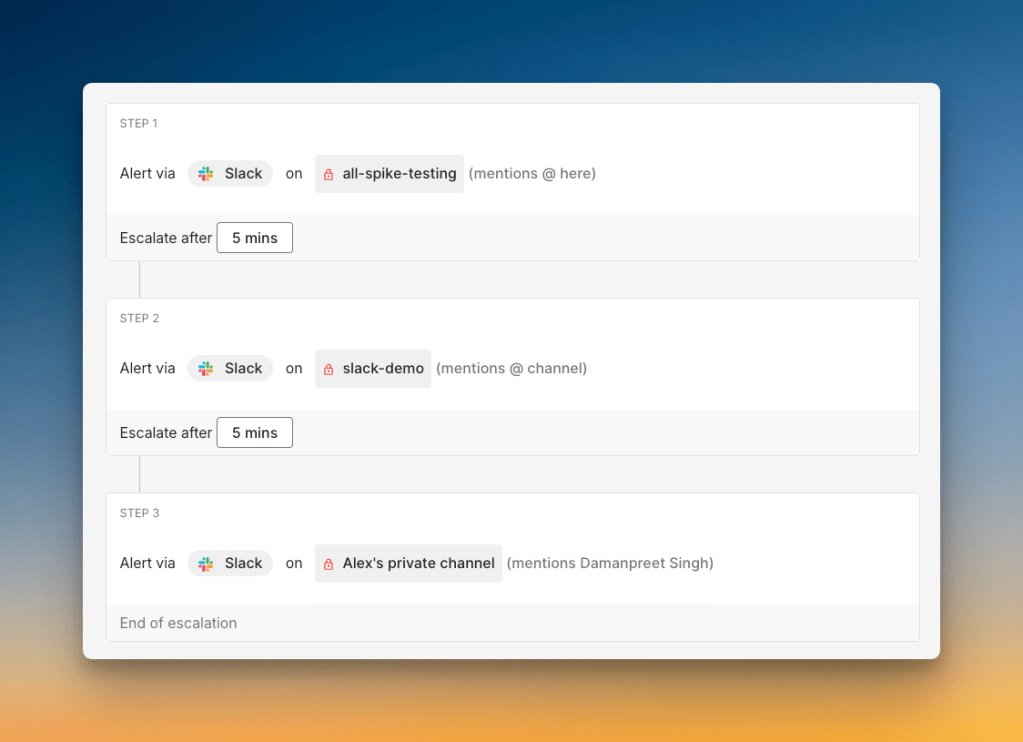
The most meaningful difference between the two tools is delivery channel control per escalation step. In Spike, you can specify not just who gets alerted at each step, but how. Step one: call Daman. Step two: SMS Priya. Step three: ping #backend-oncall on Slack. OpsGenie and PagerDuty both specify who gets alerted. Spike specifies who and how.
A few other differentiators worth knowing:
| Feature | OpsGenie | PagerDuty | Spike |
|---|---|---|---|
| Built-in status pages | No ($29–109/month extra) | No ($89+/month extra) | Yes, every plan |
Slack @here / @channel / @user mentions | No | No | Yes |
| Email acknowledgment by reply | No | No | Yes |
| Deep work / cooldown / out-of-office modes | No | No | Yes |
| Override comments | No | No | Yes |
| Starting price | $11.55/user/month | $25/user/month | $7/user/month |
- Built-in status pages: Every plan includes public and private status pages with custom domain support. OpsGenie required statuspage.io at $29–109/month extra. PagerDuty charges $89+/month per status page.
- Slack mentions: Spike supports
@here,@channel, and@specific-userin Slack alerts. PagerDuty and OpsGenie don’t.
- Email acknowledgment: Reply to an alert email with
#ackor#resto acknowledge or resolve. OpsGenie and PagerDuty require you to leave your inbox.

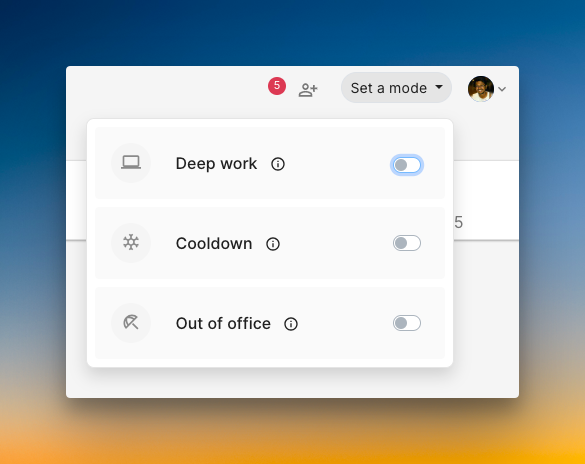
- On-call well-being: Deep work mode, cooldown mode, and out-of-office routing are built in. OpsGenie had no equivalent.
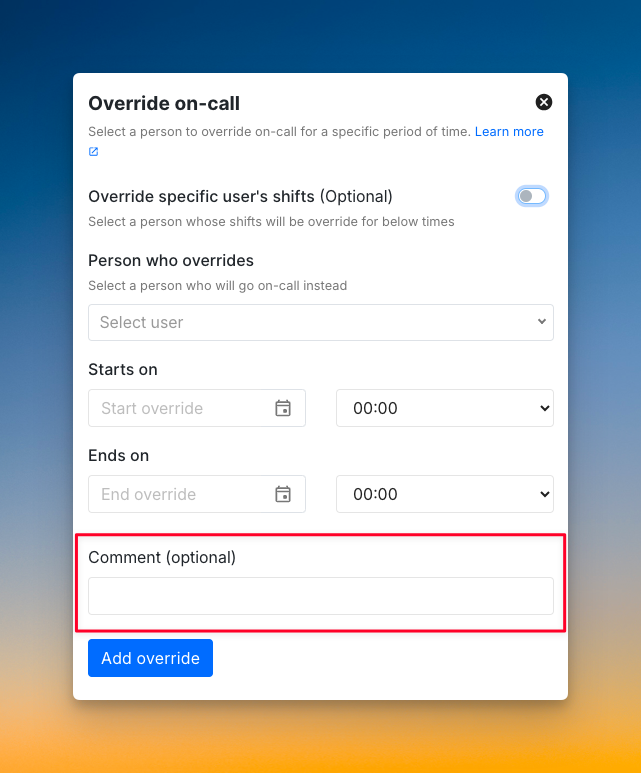
- Override comments: When someone takes your shift, they can see why. Context is attached to the override. PagerDuty has no override comments.
Spike starts at $7/user/month. And OpsGenie users get 50% off their first six months at Spike. That brings the effective cost to $3.20/user/month for the first half-year.
Hear what an OpsGenie user said about Spike:

Key point: Spike is the closest structural match to OpsGenie’s workflow model among current tools. It adds delivery channel control per escalation step, built-in status pages, and email acknowledgment. OpsGenie never had any of these.
How to Choose: JSM vs. PagerDuty vs. Spike
When OpsGenie shuts down, Atlassian’s official recommendation is to migrate to Jira Service Management (JSM). That makes JSM the natural comparison point for Atlassian users, not OpsGenie. Here’s how to decide between the three most likely options.
If you run a large enterprise with 50+ engineers and a complex distributed infrastructure: Choose PagerDuty. The AIOps add-on, 750+ integrations, and enterprise runbook capabilities justify the higher price at that scale.
If you’re deep in the Atlassian ecosystem and already paying for Jira Service Management: Evaluate JSM’s alerting features before adding another tool. Read our JSM pricing breakdown to see if it covers your needs.
If you’re an OpsGenie user who liked its simplicity and straightforward pricing: Choose Spike. It’s the closest workflow match, it costs less than OpsGenie, and it adds features OpsGenie never had.
If you need the fastest path away from OpsGenie with the least reconfiguration: Choose Spike. The on-call scheduling, escalation policy structure, and alert routing all map directly from OpsGenie’s model. See our OpsGenie migration guide for the full process.
Conclusion
PagerDuty is the right answer for a specific kind of team: large, complex infrastructure, high alert volume, and a need for enterprise integrations and ML-based noise reduction. If that’s you, the price premium is earned.
For most OpsGenie users, that’s not the actual situation. Most OpsGenie users chose it because it was simple, affordable, and did the job without complexity. PagerDuty is built for a different scale than most OpsGenie teams ever needed.
If you’re migrating away from OpsGenie and want something that works like OpsGenie but better, Spike is the closest match. It starts at $7/user/month, includes delivery channel control per step, built-in status pages, and email acknowledgment. Plus, OpsGenie users get 50% off their first six months.
Frequently Asked Questions
Is OpsGenie being discontinued?
Yes. Atlassian stopped all new OpsGenie sales on June 4, 2025. The platform will shut down entirely on April 5, 2027. After that date, Atlassian will delete all customer data remaining on the platform. Existing customers can continue using OpsGenie until April 2027, but no new trials or accounts are available.
What’s replacing OpsGenie?
Atlassian’s official recommendation is to migrate to Jira Service Management (JSM), which includes alerting and on-call features. However, JSM carries over most of OpsGenie’s limitations. That includes the lack of delivery channel control per escalation step and no built-in status page. Teams looking for a closer workflow match to OpsGenie are migrating to Spike, which starts at $7/user/month and includes built-in status pages, email acknowledgment by reply, and per-step delivery channel control.
What happens to OpsGenie data after the shutdown?
Atlassian has stated that all OpsGenie data will be deleted after April 5, 2027. This includes alert history, on-call schedules, escalation policies, and integrations. Teams should export any historical data they need to retain before migrating, and complete their migration well before the deadline to avoid data loss.
Is OpsGenie still working?
Yes, OpsGenie is still fully operational for existing customers. Atlassian stopped accepting new signups on June 4, 2025, but current customers can continue using the platform until it shuts down on April 5, 2027. After that date, the platform will go offline and all data will be deleted.
Is PagerDuty worth the price compared to OpsGenie?
For large enterprises, yes. PagerDuty’s AIOps capabilities ($799/month add-on), 750+ integrations, and enterprise runbook features justify the higher cost when teams have the scale to use them. For mid-size teams that used OpsGenie for straightforward on-call and alerting, PagerDuty’s pricing is hard to justify. It starts at $25/user/month versus OpsGenie’s $11.55/user/month, for features most of those teams are unlikely to need.
What’s more affordable than PagerDuty for OpsGenie users?
Spike starts at $7/user/month. That’s less than OpsGenie Essentials ($11.55/user/month) and significantly less than PagerDuty Professional ($25/user/month). Also, Spike offers OpsGenie users 50% off their first six months, bringing the effective price to $3.20/user/month for the first half-year.
Does Spike work like OpsGenie?
Spike is the closest structural match to OpsGenie’s workflow model among current tools. On-call scheduling, escalation policies, and alert routing all map directly from how OpsGenie worked. The main differences are that Spike adds delivery channel control per escalation step (OpsGenie didn’t have this), built-in status pages on every plan (OpsGenie required statuspage.io), and email acknowledgment by reply. Teams migrating from OpsGenie typically find Spike’s learning curve minimal.
What is the best alternative to PagerDuty?
Spike is the strongest PagerDuty alternative for teams that don’t need enterprise-scale complexity. It starts at $7/user/month versus PagerDuty’s $25/user/month. It includes built-in status pages on every plan, supports Slack @here and @channel mentions in alerts, and supports email acknowledgment by reply. Two things PagerDuty doesn’t offer at any price.
Is OpsGenie like PagerDuty?
OpsGenie and PagerDuty solve the same core problem: alerting and on-call management. But they differ in complexity and price. OpsGenie was simpler to configure and more affordable. PagerDuty offers deeper automation and more integrations, but starts at $25/user/month and charges an extra $799/month for AIOps.