
That 3 AM alert is never fun. Your heart races as you try to figure out what broke this time, and how fast you can fix it.
But with an incident response in place, that panic turns into a calm, step-by-step fix. It helps you handle everything, from a server crash to a security breach, in an organized way.
In this guide, I’ll walk you through what exactly an incident response is, why you need it, its key components, and how to build one. Also, I’ve listed the 5 best incident response tools for you.
Let’s get started!
Table of Contents
What is Incident Response
Incident response is a plan for how you handle problems. It helps you prepare for, find, and fix issues like server crashes, bugs, and security threats.
The goal is to fix things fast. You want to get your service back online with as little damage as possible.
Example of Incident Response in Action
At Spike, we recently saw our dashboard escalations start to crash. It wasn’t a full outage, but it was a critical problem for our users.
We immediately created an incident directly from Slack and jumped on a huddle to discuss the fix.
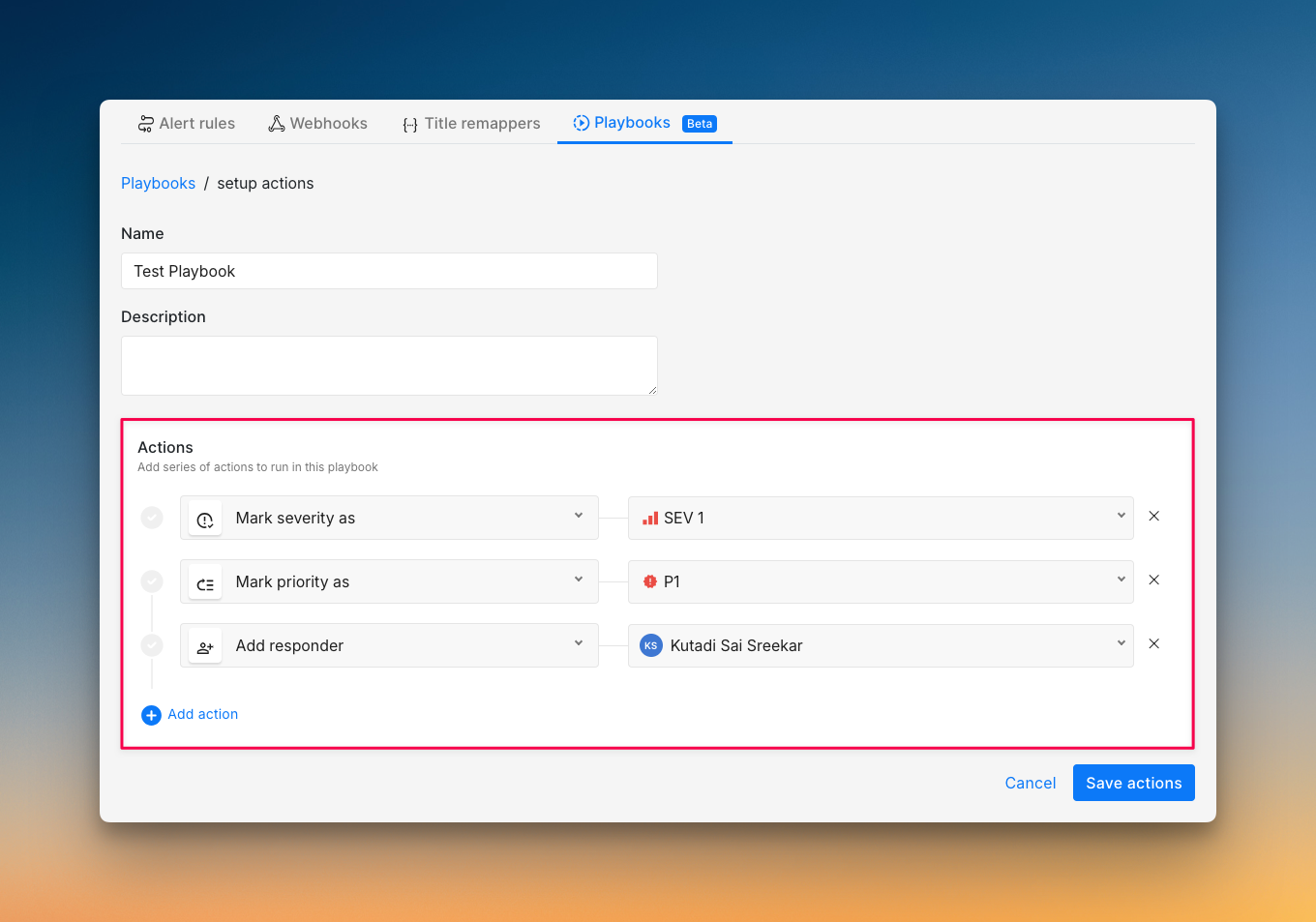
Meanwhile, our automations kicked in. Our playbook automatically added the Intercom link to the incident, set priority and severity, and created a Linear ticket.
We patched the issue in our codebase and created a pull request. This updated the Linear ticket, which changed the incident status to acknowledged in Spike. When we merged the fix, Linear marked it as done, and Spike automatically resolved the incident.
And throughout the process, we kept our status page updated so customers knew we were on top of it.
This entire sequence is an example of incident response. The process has several stages, which I’ll cover in detail in the coming sections.
Why is Incident Response Important
Companies with a formal, tested incident response plan save almost half a million ($ 473,706) per breach compared to those without one. But the benefits go far beyond just cost savings.
Incident response cuts your downtime when things break, prevents your team from burning out, and builds customer trust. It turns disasters into learning opportunities that make your system stronger.
“Having a clear incident response plan gives everyone a shared process. At Spike, it has made us more proactive, more obsessed with quality, and stronger as a team. It gives us a structured way to fight fires together.“
– Kaushik Thirthappa, Founder of Spike
Key Components of Incident Response
- Alerting Systems: They connect with your monitoring tools, watch your systems, and fire alerts when something breaks.
To learn more about Alerting Systems, read IT Alerting: Everything You Need to Know
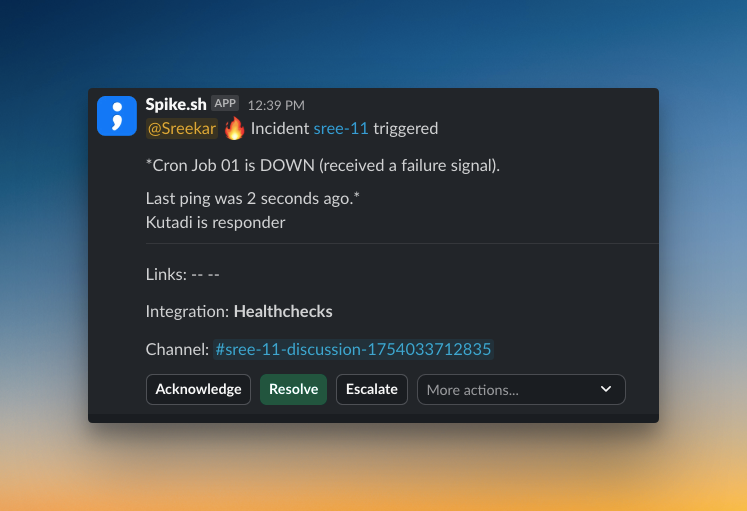
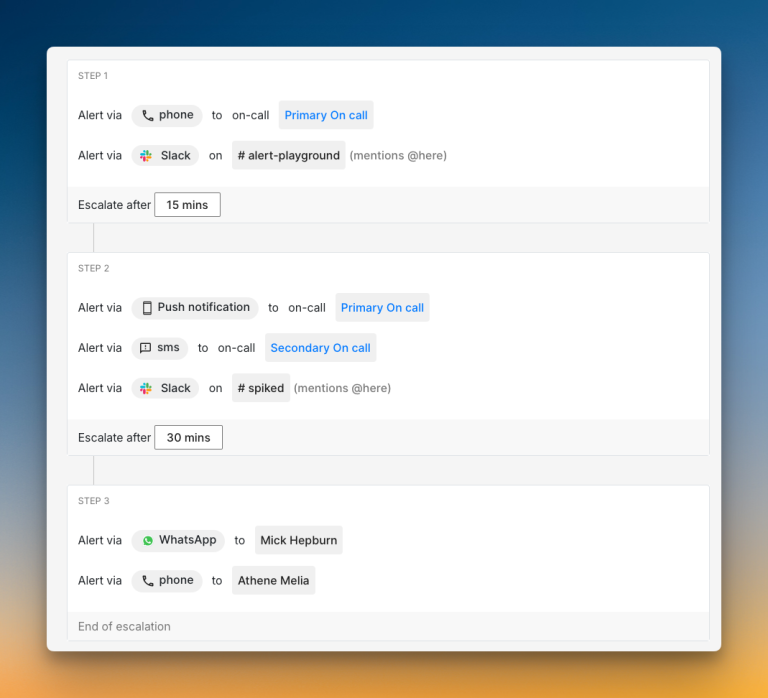
2. Escalation Policies: When the on-call engineer doesn’t respond, these rules automatically contact the next person in line, so no critical alert gets missed.
To learn more about Escalation Policies, read the blog Escalation Policies: Everything You Need to Know
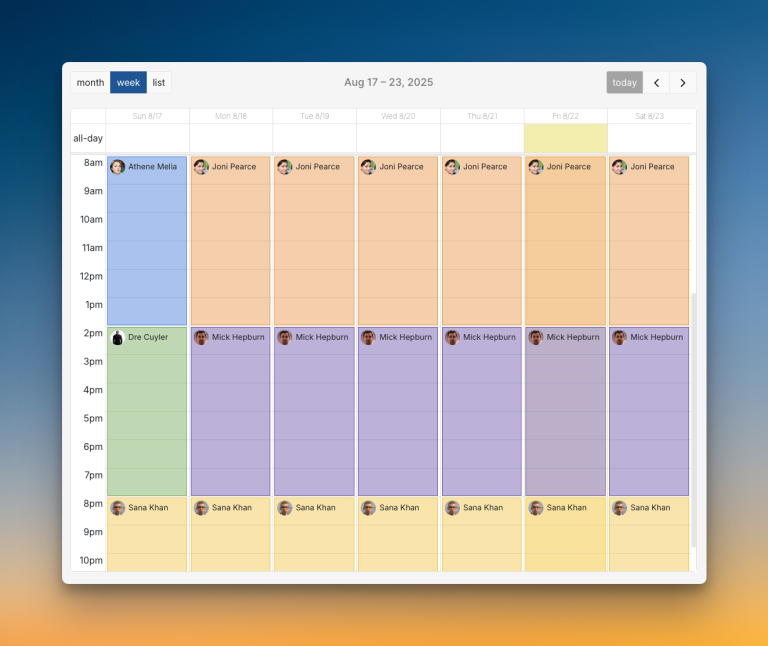
3. On-call Schedules: These show who handles alerts at any time. They make sure the right person gets woken up, not someone who’s off duty.
To learn more about On-Call Schedules, read On-Call Schedules: Everything You Need to Know
4. Incident Response Plan: Your written playbook for handling different types of problems. It tells everyone what to do and who does what.
5. Collaboration and Communication Tools: Slack channels and war rooms (Google Meet & Zoom) for team coordination, status pages for customer updates, and ticketing systems for tracking progress.
Incident Response Team: Roles and Responsibilities
Incident response isn’t a one-person job. You need a team with clear roles so everyone knows what to do.
- On-call Engineer: The first responder. They get the alert, do initial checks, and decide if a problem needs more help.
- Incident Manager: The leader of the response. This person coordinates the team, gets resources, and makes sure everyone follows the plan.
- Subject Matter Experts (SMEs): The technical specialists who understand the broken systems. They dig into the details and help fix the problem.
- Communication Coordinator: The voice of the team. They write updates for status pages, notify stakeholders, and translate technical problems into clear messages.
- Stakeholders: Business leaders who need to know what’s happening. They don’t fix problems, but need updates to handle customer questions and business decisions.
At Spike, our small team wears different hats during an incident response. Daman usually takes the on-call engineer role and digs into the code to fix things. Kaushik acts as the incident manager, handling business decisions and jumping in to help with the fix when needed. And I, the communication coordinator, write status page updates and translate technical issues into clear messages for our users.
Incident Response Lifecycle
Incident response lifecycle involves different stages:
- Initial Response: An alert fires, the on-call engineer acknowledges it, and assesses the impact. They might run some automated scripts, try to resolve the issue, or escalate it to the subject matter expert (SME).
- Team Collaboration: The team opens a dedicated Slack channel or a war room (Google Meet or Zoom) to coordinate. They create a Jira or Linear ticket to track progress.
- Incident Communication: The communication lead updates the status page for customers. They also send regular updates to stakeholders so business leaders know the impact.
- Post-Incident Actions: After fixing the problem, the team documents the incident timeline, writes resolution notes, and creates a detailed post-mortem for the incident.
How to Set Up an Effective Incident Response
You need an incident response tool first. Something like Spike that handles alerts, on-call management, and automation in one place. Then follow these steps:
Step 1: Pre-Incident Preparation
Start with the basics. Create on-call schedules, set up escalation policies, and write runbooks for common problems. This gives your team structure when things break.
Next, add automation to save time and reduce mistakes. Use alert rules to auto-triage incidents based on keywords. For example, if an alert contains “database down,” set it to severity 1 automatically.
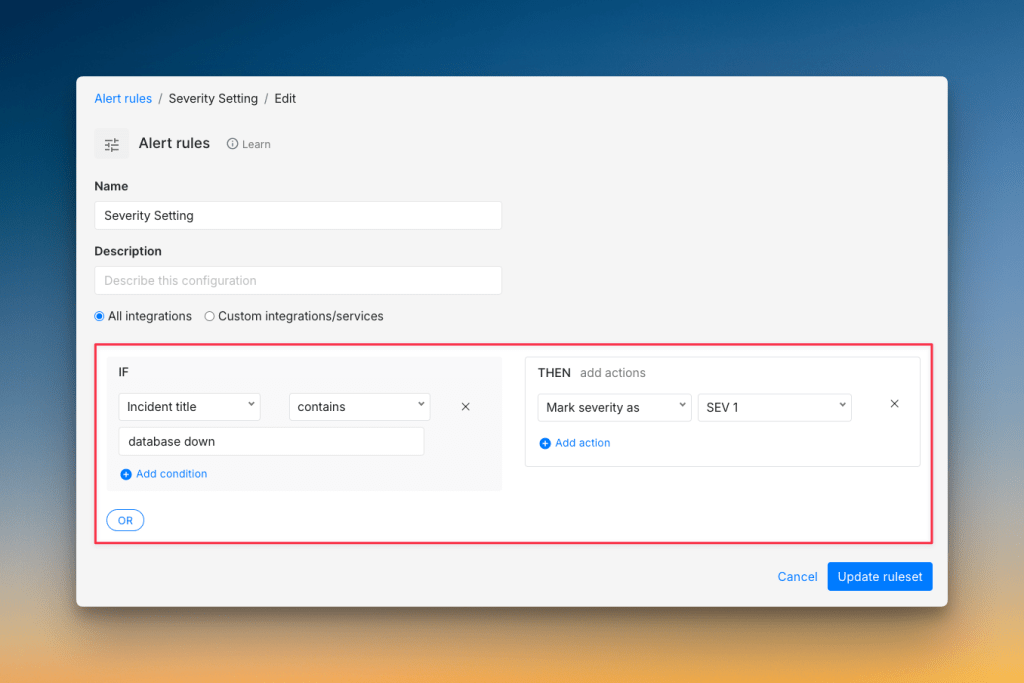
Set up auto-resolution for known temporary issues, automatically add the right responders to incidents, and trigger scripts to restart services or gather logs. Create Jira or Linear tickets automatically so nothing gets lost.
At Spike, we built a simple Playbook that automatically adds an Intercom link to every new incident. This small automation had a huge impact on our incident response.
No matter if an alert comes from email or Slack, the customer conversation is just one click away. We don’t have to waste time searching for the right support ticket anymore.
This simple automation gives us instant context and saves us a lot of time when every second counts.
Step 2: During the Incident
Your on-call engineer should follow the runbooks you created. Open war rooms in Slack or Teams so the team can coordinate. Update the status page about the incident. And focus on fixing the issue fast.
Step 3: Post-Incident Actions
Update your status page to tell customers the problem is fixed. Send summary updates to stakeholders about what happened and what you did. Run a post-mortem to learn what went wrong and what you can automate better next time.
Incident Response Best Practices
These incident response best practices help you handle problems faster with less stress:
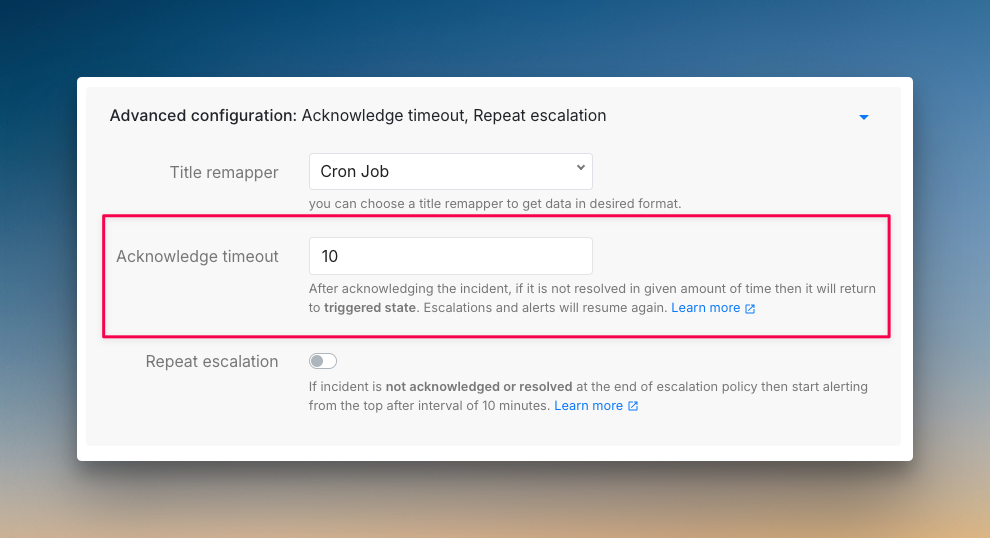
- Set acknowledgment timeouts: If the on-call engineer acknowledges an alert but can’t fix it within a set time, escalate automatically. This gets more help on tough problems faster instead of letting one person struggle alone.
- Create incident response playbooks for common tasks: Build automation for updating status pages, adding team members to channels, and creating Jira tickets. This saves time during an incident when every minute counts.
- Keep stakeholders informed: Even people who can’t fix the problem need updates if they’ll face consequences from upset customers. For example, your operations head needs to know about outages so they can handle business-related issues better.
- Be transparent with customers: People appreciate honesty. Tell them when things are broken and keep them updated as you work on a fix.
- Learn from every incident: After each problem, ask what you can do better. See what actions you can automate for the next time.
Two best practices we follow at Spike: be transparent about incidents and integrate key tools.
We are completely open about our incidents. We update our status page regularly, communicate directly with customers about issues, and even publish detailed post-mortems on our blog. This honesty has built strong trust with our users.
We also connected all our key tools: Linear, GitHub, Intercom, and Slack all feed into Spike. When we update a ticket in one place, it reflects everywhere else. This simple integration saves us a lot of manual work, keeps everyone up-to-date, and makes our entire incident response process much smoother.
5 Best Incident Response Software
| Tool | Best For | Starting Price |
|---|---|---|
| Spike | Teams of all sizes wanting a simple, affordable, yet powerful tool | $7/user/month |
| PagerDuty | Large enterprises needing advanced automation and ML insights | $25/user/month |
| Incident.io | Teams managing incidents entirely within Slack or Teams | $19 base + $12/on-call user/month |
| Squadcast | SolarWinds users who need integrated incident response | $12/user/month |
| Zenduty | Teams wanting to connect incident response with ITSM workflows | $6/user/month |
- Spike: Combines powerful automation with a clean interface that any team can pick up fast. It offers one-click war rooms, automatic ticket creation, and flexible alert rules without breaking your budget.
- PagerDuty: An enterprise-grade tool with 700+ integrations and machine learning capabilities. It’s battle-tested but comes with complexity and higher costs that smaller teams might find overwhelming.
- Incident.io: Works great if your team lives in Slack or Teams. You can manage entire incidents without leaving chat, though you’ll pay extra for on-call features that other tools include.
- Squadcast: Focuses on SRE workflows with advanced alert routing and noise reduction. It fits well with SolarWinds environments and offers good automation.
- Zenduty: Bridges incident response with broader IT service management. It offers structured workflows and stakeholder communication tools, plus AI-powered post-mortems.
Detailed Feature Comparison
| Checklist Item | Spike | PagerDuty | Incident.io | Squadcast | Zenduty |
|---|---|---|---|---|---|
| Separate spaces for teams to manage their incidents | ✅ | ✅ | ✅ | ✅ | ✅ |
| Automatic incident suppression | ✅ | ✅ | ✅ | ✅ | ✅ |
| Granular control over incident suppression | ❌ | ✅ | ✅ | ✅ | ❌ |
| Trigger incidents from incoming emails directly | ✅ | ✅ | ❌ | ✅ | ✅ |
| Trigger external webhooks automatically | ✅ | ✅ | ✅ | ✅ | ✅ |
| Auto-resolve incidents when system is healthy | ✅ | ✅ | ✅ | ✅ | ✅ |
| Auto-detect incident severity and priority | ✅ | ✅ | ✅ | ✅ | ❌ |
| Route alerts based on severity and priority | ✅ | ✅ | ✅ | ✅ | ❌ |
| Route alerts based on time of day | ✅ | ✅ | ✅ | ✅ | ✅ |
| Acknowledge alerts on email | ✅ | ❌ | ❌ | ❌ | ✅ |
| Auto-update status page incidents | ✅ | ✅ | ✅ | ✅ | ✅ |
| Ready-to-use templates (escalations, alert rules, and on-call) | ✅ | ❌ | ❌ | ❌ | ❌ |
Open-Source Incident Response Tools
- GoAlert: A simple tool you can host yourself. It focuses on reliable SMS and voice notifications for a lightweight setup.
- Grafana OnCall: Perfect for Grafana users. It integrates alerting and on-call scheduling directly into existing monitoring dashboards.
- Dispatch: Helps coordinate your team with case tracking and Slack integration. It’s good for small teams during major outages.
- Keep: Lets you route alerts from different sources using a YAML file. It’s a flexible option if you want to manage alert flows with code.
For more incident response tools, read the blog: 9 Best Incident Response Tools
Conclusion
Incident response isn’t just about fixing things when they break. It’s about creating a calm, predictable process that turns chaos into control.
When you have a clear plan, the right team, and good tools, problems become learning opportunities. You stop fighting fires and start building a more resilient system.
Every incident you handle makes your team stronger. It helps you find weak spots and automate better next time. This is how you build a service that customers can trust, even when things go wrong.
Next Steps
A good incident response plan is your foundation, but automation is what makes your process smooth.
Automation helps you triage alerts, run diagnostics, and handle routine tasks automatically. This frees up your team to focus on solving hard problems instead of doing repetitive work.
FAQs
- What’s the difference between an incident and a problem?
An incident is a single event that disrupts service, like a server crash. A problem is the underlying cause that could trigger multiple incidents, like a memory leak that causes servers to crash repeatedly.
2. What are common challenges in incident response, and how do you resolve them?
- Alert Fatigue: Use automation to suppress low-priority alerts and group related ones together. This helps in reducing the alert noise.
- Poor Communication: Assign a dedicated communication lead and use templates for consistent updates. Keep both internal teams and customers informed with regular status page updates.
- Blame Culture: Teams focus on “who caused it” instead of “what went wrong,” which makes people hide mistakes and prevents learning. Run blameless post-mortems that fix processes, not people.
3. Who has the overall responsibility for managing incidents?
The Incident Manager or Incident Commander has overall responsibility for managing incidents. They coordinate the response, allocate resources, and make sure the team follows the established incident response process.